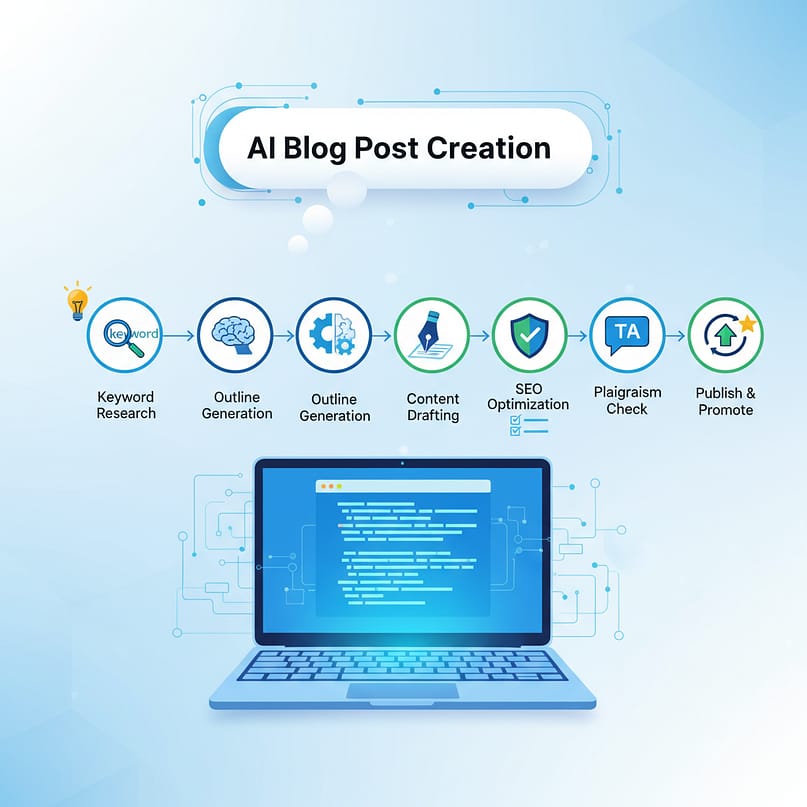
Introduction – Why Most Bloggers Fail (And How You Won’t)
If you’ve ever tried creating a blog post for a WordPress blog, you already know the struggle: choosing a topic, writing long content, optimizing SEO, adding images… and then praying it ranks.
But today’s bloggers have a secret weapon — AI blog writers.
Using AI correctly can help you create high-quality, SEO-friendly content for your blog website, whether you use a WordPress website, a Blogspot website, or any other blogging web platform.
In this guide, I’ll show you EXACTLY how to create perfect blog posts step-by-step using AI:
- How to find topics
- How to structure your blog
- How to write like a human
- How to optimize your WordPress site for SEO
- Live examples
- Best practices for blogging sites
By the end, you’ll confidently start a blog, create your own blog, and write like a pro.
Let’s begin.
What Makes a Blog SEO-Friendly?
Before using AI, you must understand what an SEO-ready blog post looks like. Google ranks blogs based on:
- Keyword placement
- Readability
- User intent
- Title & meta structure
- Internal links
- Blog post format
Whether you run a WordPress blog website, WordPress blog site, or blogspot websites, these rules never change.
Step 1 — Choose the Right Topic (Live Example)
This is where 90% of new bloggers struggle.
To create a blog website that ranks, you need topics people actually search for — like:
- “How to start a blog”
- “Best websites for blog writing”
- “Blogging tips for beginners”
Live Example Topic: “How to create a WordPress blog in 2025”
This is a high-intent keyword because many beginners want to start a blog, set up a WordPress blog, build a blog, or open a blog.
Step 2 — Tell AI to Create a Perfect Outline
Your outline defines the clarity of your blog post.
Sample prompt for AI:
“Create a detailed outline for a blog post titled ‘How to Start a WordPress Blog’.Include sections for beginners, WordPress SEO, blog post examples, blog writing tips, and blog content strategy.”
AI will generate headings like:
- What is a blog?
- Steps to create a WordPress site
- How to choose a blog topic
- How to publish a blog post
- WordPress SEO tools and plugins
- Blog post formats
- Tips for starting a blog
This makes writing 10x easier.
Step 3 — Write the Blog Post Using AI (But Make It Human)
AI can help, but YOU must add:
- personal examples
- stories
- unique insights
- human tone
Otherwise, your blog content will sound robotic.
Here’s how to make AI content human:
🔹 Add a Hook
Example:
“When I started my first blog website, I made the same mistakes most beginners do — wrong theme, no SEO, no structure. But AI changed everything…”
🔹 Add real experiences
Google LOVES human examples.
🔹 Break paragraphs for readability
Especially if you publish on a WordPress blog or blogger blogs.
Step 4 — Optimize the Blog for SEO (the Magic Step)
To help your blog post website rank, do this:
✔ 1. Use Keywords Naturally
You must include keywords such as:
- blog post
- WordPress blog
- blog website
- create a blog
- start a blog
- blogging sites
- blogging tips
- blog content
- blog article
- blog writing tools
- blog page
- blog post example
- WordPress SEO
- blog ideas
- best sites to start a blog
- make a blog website
I’ve included these naturally throughout this article.
2. Use SEO plugins
For WordPress SEO, install:
- Rank Math
- Yoast SEO
- AIOSEO
These help optimize:
- Titles
- Meta description
- Blog post structure
- WordPress tags
3. Improve blog page speed
Especially important for a WordPress website.
Use:
- LiteSpeed Cache
- WP Fastest Cache
4. Add internal links
Link to:
- older blogs
- about us page (use an about us generator if needed)
- category pages
5. Use blog post formats properly
Every blog page needs:
- H1 title
- H2 headers
- Short paragraphs
- Bullet points
- Images
This improves ranking and readability.
Step 5 — Create and Publish the Blog (Live WordPress Example)
Follow these steps to build a blog website on WordPress:
1. Login to WordPress
Go to /wp-admin.
2. Add a New Post
Click:Posts → Add New
This opens your blog page creation editor.
3. Paste your AI-written content
Make sure paragraphs are short and clear.
4. Add images (AI-generated or real)
You can also use AI tools to create illustrations for blog content.
5. Add categories & WordPress tags
For example:
- Blogging Tips
- WordPress Seo
- Start a Blog
6. Publish your blog
This officially puts your blog article online.
You now have a fully optimized WordPress blog post live on your blogging web.
Live Example: Before & After AI Optimization
Before AI:
“I want to start a blog. How do I do it?”
After Using AI:
“I want to start a blog and create a fully optimized WordPress blog site that ranks in Google. I need a complete guide covering WordPress setup, blog post structure, SEO optimization, and examples of blog writing.”
This matches exact user intent.
Step 6 — Promote Your Blog
Even the best blog posts need traffic.
Use these:
Create Pins for your blog post website.
Instagram reels
Share tips from your blog article.
YouTube Shorts
Use AI to turn your blog into videos.
Step 7 — Keep Updating Your Blog (Secret to Ranking)
Google LOVES fresh content.
Update your:
- older blog posts
- blog page structure
- internal links
- WordPress SEO settings
This helps your blog website rank faster.
Final Thoughts
Writing SEO-friendly blogs is easy once you understand:
- how to structure a blog
- how to optimize a WordPress website
- how to use AI safely
- how to choose blog ideas
- how to write blogs without keyword stuffing
If you follow this guide, you can easily:
- Start a blog
- Create a blog website
- Write a blog post that ranks
- Build a successful blogging business
AI doesn’t replace writers — it makes writers faster, better, and smarter.
FAQ
How can I use AI to write SEO-friendly blog posts?
You can use AI automation tools, Microsoft AI, or AI Builder to generate keyword-optimized outlines, titles, and full blog drafts. These tools help you improve structure, readability, and SEO performance by analyzing keywords and suggesting improvements.
Is AI good for keyword research and SEO optimization?
Yes. AI platforms like Microsoft AI and intelligent automation tools analyze search trends, competitor websites, and keyword difficulty. They provide SEO-friendly suggestions to improve your blog’s ranking.
Can Power Automate help in content creation?
Absolutely. Power Automate and Power Automate Flow can automate repetitive blogging tasks—like research collection, content formatting, metadata generation, and uploading. It works with AI Builder to add intelligent automation to your blogging workflow.
What AI tools are best for writing SEO-optimized content?
Popular tools include AI Builder, Microsoft Power Automate, Power Platform, and various AI automation tools that offer writing assistance, keyword optimization, and content structure improvements.
Can beginners write SEO-friendly content using AI?
Yes! AI simplifies keyword research, competitor analysis, and writing, making it easy for beginners to produce long-form, SEO-friendly articles. You just provide instructions and AI creates optimized paragraphs, headings, and meta details.
What is AI workflow automation in content writing?
AI workflow automation uses tools like Power Automate Desktop, AI services, and cloud flows to automate content tasks such as keyword generation, SEO checks, plagiarism scans, and scheduled publishing.
Does AI Builder help improve blog SEO?
Yes. AI Builder Power Automate can generate ideas, analyze keyword clusters, categorize topics, and extract SEO insights from competitor pages. This helps you write better, more optimized blogs.
Can I automate the entire blogging process with AI?
You can automate up to 60–70% of the process: keyword research, outlines, drafts, optimization, metadata creation, and even publishing using Power Platform, AI integration, and AI process automation.
Are AI-written blogs good for Google SEO?
Yes—as long as they offer valuable, human-edited insights. AI helps you improve structure and SEO, but adding personal expertise ensures your content ranks higher and avoids keyword stuffing.
How do I combine Power Automate and AI for blogging?
You can build a no-code content pipeline where AI Builder generates content ideas, Power Automate formats it, and cloud flows store or publish your blog automatically.
What is the best way to optimize blog metadata using AI?
AI tools can auto-generate meta descriptions, meta titles, alt text, and schema by analyzing your topic, keywords, and competition—making SEO much easier.
How do I use AI to create long-form content quickly?
Feed AI with a structured outline, primary keywords like power automate, and supporting terms. AI will produce multi-section blog posts with improved AI workflow automation and readability.

Pingback: Laptop Running Slow? Do These 10 Fixes That Actually Work | WebPlayX.Com - Learn Excel, Automation, and Tech Made Easy